


WeChat Pay allows international users to link eligible bank cards and make payments at many shops, restaurants, transport services and other businesses across China. (Tencent)
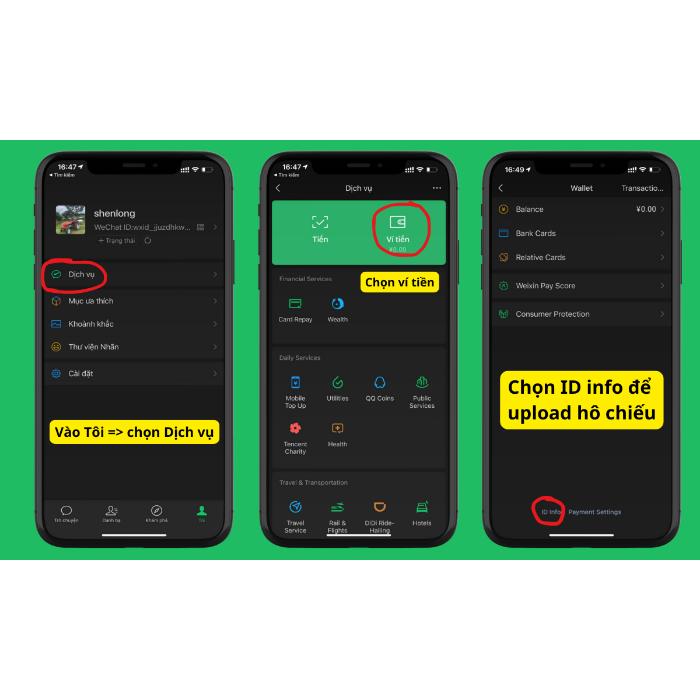
1. REGISTER FOR WECHAT
-
Download the WeChat app.
-
Register using your current mobile phone number.
-
Enter the verification code and complete the registration process.
International users can register for WeChat using an overseas mobile number.
2. OPEN WECHAT PAY
After logging in:
Me → Services → Wallet
Check the payment section and complete any verification required by the app.
3. LINK YOUR BANK CARD
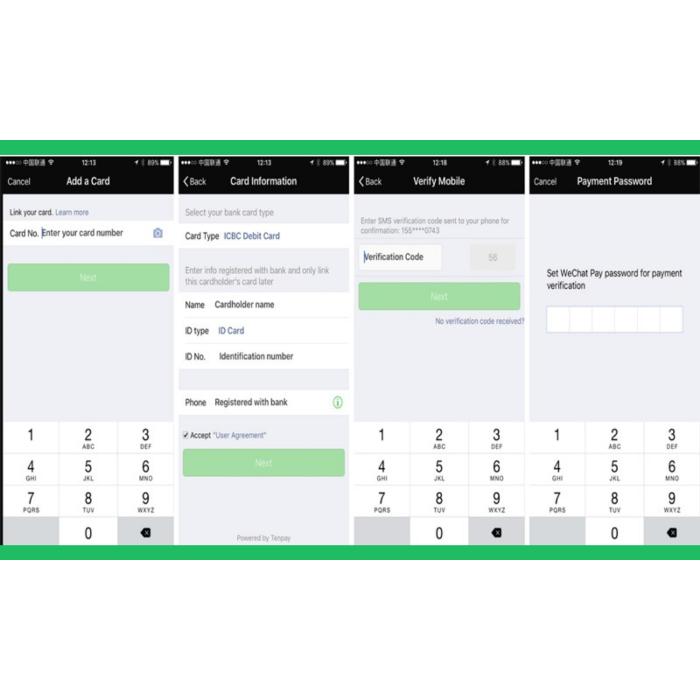
Go to:
Wallet → Bank Cards → Add a Bank Card
Then:
-
Enter your card details.
-
Provide the required personal information.
-
Complete the verification process.
-
Check that the card has been added successfully.
WeChat Pay supports a number of international card networks, including Visa, Mastercard, JCB, American Express, Discover and UnionPay. Actual availability depends on the card and the issuing bank. (Tencent)
4. PAY BY SCANNING A QR CODE
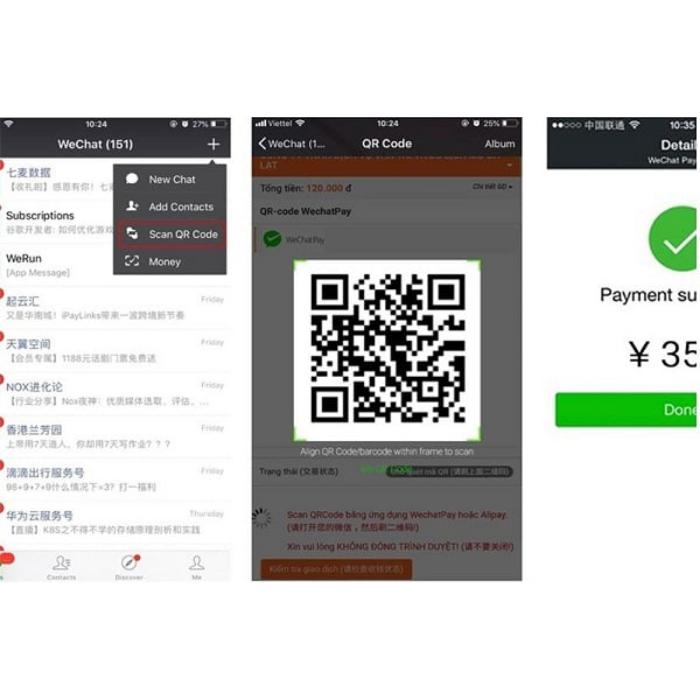
When making a purchase:
WeChat → Scan → Scan the merchant's QR code
Then:
-
Check the recipient's name.
-
Check the payment amount.
-
Select the payment method.
-
Confirm the transaction.
-
Check that the payment has been completed successfully.
WeChat Pay supports QR-code payments at a wide range of merchants in China.
5. PAY USING YOUR PAYMENT CODE
Some shops may ask you to show your payment code instead.
Go to:
WeChat → Me → Services → Money
Display your Payment Code and allow the cashier to scan it.
WeChat Pay supports both scanning the merchant's QR code and having the merchant scan the customer's payment code.
6. CHECK THE TRANSACTION
After making a payment:
-
Check the amount.
-
Check the transaction status.
-
Check the payment notification in WeChat.
If the transaction fails, do not immediately pay again. Check the status of the previous transaction first.
7. IF THE PAYMENT DOES NOT WORK
Check the following:
Bank card → Payment limit → Account verification → Internet connection → Payment method
If the problem continues, contact your card-issuing bank or WeChat Pay customer support. Tencent provides Weixin Pay support for international users.
IMPORTANT NOTES
When using WeChat Pay in China, international students should also prepare Alipay, a backup bank card and a small amount of RMB cash in case the main payment method is temporarily unavailable.
Payment limits and fees may vary depending on the card, account and current service policies. In 2026, Tencent also introduced specific fee-waiver support for some first-time international-card users, subject to the applicable terms and limits. Check the information shown in the app before confirming a transaction.