


HOW TO PAY WITH ALIPAY: A STEP-BY-STEP GUIDE
Alipay is one of the most widely used payment apps in China. International students can use Alipay to pay in shops and restaurants, make online purchases and pay for various services, provided that their account and payment method are eligible.
If you are preparing to study in China, you may also find our guide on life in China: WeChat, Alipay and payment methods for Vietnamese students useful.
1. WHAT DO YOU NEED BEFORE USING ALIPAY?
Before making a payment with Alipay, make sure you have:
-
The Alipay app installed on your phone
-
An Alipay account registered with a phone number you currently use
-
Completed any identity verification required by Alipay
-
A supported payment method linked to your account
-
Checked your available balance or payment limit before making a transaction
If you are using an overseas bank card, whether it can be linked and used for payments depends on the type of card, the issuing bank and Alipay's current requirements.
2. HOW TO PAY BY SCANNING A SHOP'S QR CODE
This is a common payment method when shopping, eating out or using services in China.
Step 1: Open Alipay
Open the Alipay app on your phone.
Step 2: Select Scan
Choose the Scan function to open the QR code scanner.
Step 3: Scan the shop's QR code
Point your phone's camera at the QR code provided by the shop.
Step 4: Enter the payment amount
Check the recipient or merchant information and enter the amount you need to pay.
Step 5: Check the payment details
Make sure the recipient and payment amount are correct before confirming the transaction.
Step 6: Complete authentication
Depending on your account settings, you may need to confirm the payment using your PIN, fingerprint, facial recognition or another security method.
Step 7: Check the payment status
Make sure the app shows that the payment has been completed successfully.
Always check the recipient and payment amount carefully before confirming a transaction.
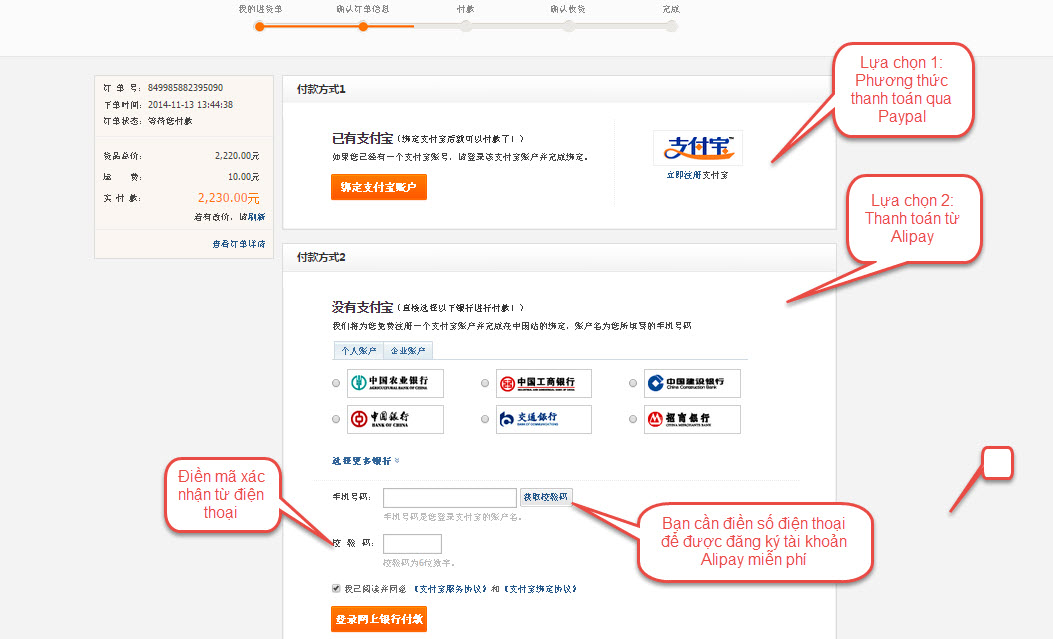
3. HOW TO PAY USING AN ORDER QR CODE
Some shops and payment systems generate a dedicated QR code for each order.
Follow these steps:
-
Open Alipay.
-
Select Scan.
-
Scan the QR code displayed at the shop or on the payment screen.
-
Check the order details.
-
Check the total amount.
-
Confirm the payment.
-
Complete any required authentication.
-
Check the transaction status.
If the shop's system does not immediately show the payment as completed, do not pay again straight away. Check your Alipay transaction history first.
4. HOW TO PAY BY SHOWING YOUR PAYMENT CODE
Some shops use a different method where the customer displays their Alipay payment code and the cashier scans it.
Step 1: Open Alipay.
Step 2: Select Pay or Payment to display your payment code.
Step 3: Show the code to the cashier.
Step 4: Check the payment notification on your phone.
Step 5: Check your transaction history if necessary.
Do not send screenshots of your payment code to other people unless absolutely necessary.
5. HOW TO PAY ONLINE WITH ALIPAY
If a website or app supports Alipay, you can usually select it as your payment method during checkout.
Step 1: Select your products and proceed to checkout.
Step 2: Check the products, quantities, delivery charges and total amount.
Step 3: Select Alipay as your payment method.
Step 4: You may be redirected to an Alipay payment page or shown a QR code.
Step 5: If a QR code appears, open Alipay, select Scan and scan the code displayed on your screen.
Step 6: Check the payment amount in Alipay.
Step 7: Confirm and complete the payment.
Step 8: Return to the shopping website or app and check the order status.
6. HOW TO CHECK A PAYMENT AFTER THE TRANSACTION
After making a payment, check the following information:
-
Amount paid
-
Recipient or merchant name
-
Transaction date and time
-
Payment status
-
Order details, if you paid for an online purchase
If the money has been deducted but the order has not been updated, do not make another payment immediately.
Check your Alipay transaction history first and contact the merchant if necessary.
7. WHAT TO DO IF YOUR ALIPAY PAYMENT FAILS
If Alipay does not allow you to complete a payment, check the following:
-
Your internet connection
-
Your balance or payment method
-
Your available payment limit
-
Your account verification status
-
Your linked card details
-
Whether the QR code is still valid
If the problem persists, you can try another available payment method.
Students living in China may also wish to set up WeChat Pay as an alternative payment option. See our guide to paying with WeChat Pay in China for step-by-step instructions.
8. IMPORTANT SECURITY TIPS WHEN USING ALIPAY
-
Check the recipient before confirming a payment.
-
Check the payment amount carefully.
-
Never share your password, PIN or verification code with anyone.
-
Do not scan QR codes from unknown or untrusted sources.
-
Do not allow other people to use your Alipay account.
-
If a payment fails, check its status before attempting the transaction again.
-
For larger transactions, check the applicable limits and fees in the app beforehand.
CONTACT INFORMATION
SONG DA TOHOKU JOINT STOCK COMPANY
Address: L02-L01, Area A, Duong Noi Urban Area, Duong Noi Ward, Hanoi, Vietnam
Hotline: 0989 044 852
Email: tohokusongda2014@gmail.com
Website: https://tohoku.vn